
Almost-Monthly Blogs ⟡ Join the Newsletter ⟡ Free PDFs

So, you want to start a blog. You have something to say, and you love writing. Or you want to help others while sharing your own experiences.
But starting a new endeavor always takes time and energy. And where do you even start?
Before you can really start making blogs or showcasing your work online, you have to know what CMS (content management system) to use, where and how to host your content, get a domain, and more.
I’ve been blogging and creating content, assets, and marketing myself through social media for the last three years. I also hate gatekeeping, so check out how you can start blogging using this guide!
Choose a Content Management System (CMS)
So, to start a blog, you need a Content Management System. What is that, you ask? Well, it’s a framework to access everything you plan to publish or showcase on your website. Basically, you use it to publish digital media.
For example, many people like to use Squarespace or Wix for this. But I think WordPress (.org, not .com) is the way to go. By the way, this blog is not sponsored by anyone.
Sadly, building a blog isn’t simply about a desire to write; it’s an entire venture on its own. From marketing to content and asset creation, you run the show. So if you’re still interested, read on!
Popular CMS Websites and Frameworks:
There are several different ways to begin building your website. In this blog, I’ll be focusing on my knowledge and experience running Kat in Japan, but LTDT has a great article on website builders you can check out as well.
Also, ask yourself: Why do you want to start a blog or a website? Do you want to make money? Do you want to share your ideas, or want to help people? And most importantly, do you want your website to scale? Either way, you have to know your reason for creating a site before choosing a builder.
Website Builders
Squarespace
Squarespace is probably the poster child for website builders. You can easily create blogs with drag-and-drop functions and lots of beautiful templates.
It’s a very quick way to set up a professional-looking site. However, and this is a big “however”, getting access to all of those professional templates and plug-and-play builders comes with a cost.
Squarespace charges a subscription fee, and though you can actually monetize through Squarespace now, you have to take into account the upfront costs. A subscription for their “Core” offering is $29/month as of the time of writing. That’s almost $350 per year.
Wix
Wix is another website builder that’s been in the game a long time. Its “Core” offering is the same price ($29/month) as Squarespace at this time. Wix also boasts a drag-and-drop builder, as well as professional templates.
While I don’t see nearly as many ads for Wix as I do for Squarespace, it’s still a well-known website and portfolio builder.
WordPress.com
If your main goal is to post blogs for fun or to start a blog for creativity’s sake, WordPress.com is a platform where you can get your ideas out there. It kind of reminds me of Tumblr, honestly.
You can make your own page, and they have several pricing tiers, but at the end of the day, it’s not a good site to go with if you eventually plan to monetize. You also can’t have a custom domain name, which makes it hard for SEO to find you.
Carrd
If all you’re looking for is a place to put some basic information, websites like Carrd or Linktree are great. You can create a landing page for visitors to get an idea of who you are and provide ways to get in touch. However, it lacks functionality for creating blogs or in-depth websites.
Build-it-Yourself
WordPress.org
There are, of course, other CMS’s but WordPress is the standard when it comes to creating a website. It provides the framework; all you need to do is get your own website domain name and hosting, and you’re ready to go. It takes more of a learning curve to understand, but once you get it, it’s golden.
It’s also incredibly versatile. Thanks to business- and community-made plugins, you could host a recipe blog, have a built-in shopfront, start a newsletter, and more.
We’ll be going with WordPress as our modus operandi.
How to Start a Blog
Get a Domain and Hosting
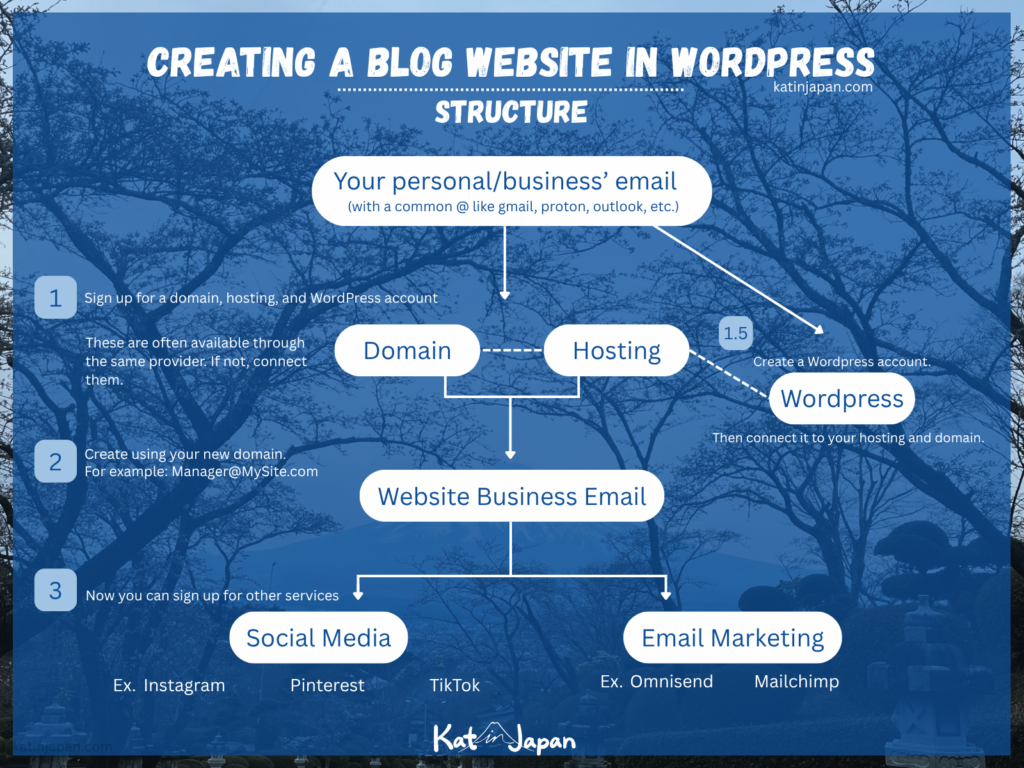
So you have your website idea– great! This is where things get more complicated. To start a website with WordPress, you need to have a domain and a host.
Now, domains and hosting both require an upfront cost as well, but are comparatively lower than Squarespace.
What Does it Cost to Start a Blog?
In my case, the domain for Kat in Japan costs around $20, and my hosting is around $170 per year. Including things like Akismet, a spam reducer plugin, my costs are just about $200 a year.
However, my hosting plan also allows me to have “unlimited” sites. All I have to do is pay for the domains, and they’re pretty cheap. So to start a new blog, I’m not as limited when it comes to hosting as I would be if I used an all-in-one builder like Squarespace or Wix.
If you prefer to get into the nitty-gritty of website ownership, I recommend using WordPress with a custom domain and your own hosting.
Domains
A domain is basically your website URL. It will be a memorable, unique name for you to publish your blogs under. You can buy domains from several different providers.
If you know which hosting site you want to use, you can also get your domain from them.
Hosting
There are tons of hosting companies to choose from. It can be hard to choose at first, but I ended up going with Hostinger based on reviews and sign-up deals.
When you’re researching hosting, remember to check what the cost will be after your initial offer period ends. For example, most hosting sites offer a reduced fee to start, but after a 1- or 2-year period, the cost increases.
Some hosting sites include Bluehost, Hostinger, and GoDaddy. Most reviews I came across didn’t recommend GoDaddy for more than a domain, but your mileage may vary.
Setup WordPress
Follow these steps to start a blog on your WordPress site.
- Come up with an idea/niche and a name for your blog and URL
- Make a list of ideas/brainstorm post ideas
- Put these in a content calendar: free template
- Create a tagline for your blog
- Make a WordPress.org account
- Get a domain name (URL)
- Create your business email using this domain name
- Get a hosting plan
- Connect your domain and hosting with WordPress
- Download a theme like Blocksy and its add-ons
- Decide on an editor (Blocksy, Gutenberg, Elementor, etc.)
- Download Plugins for: forms, sitekit, SEO, cookies, cache, image size reduction, and email marketing
- Caution: some of these don’t play nice with each other
- You can add more later
- Set up your theme – Customize
- Make your logo, select your colors (and hex codes)
- Did you know I offer Logo creation services?
- Make and edit your core pages
- Home, About, Posts (blogs), Contact
- Create copy (the written content) for these pages
- Disclaimer, privacy policy, terms and conditions, and cookies policy
- Home, About, Posts (blogs), Contact
- Make social media accounts with your business email
- Use resources like Meta’s account center or Later.com to schedule posts
- Set up forms
- Set up spam prevention plugins like reCAPTCHA or Akismet
- Set up WP Contact Form 7 and Flamingo plugins to make and keep data from forms
- Set up your newsletter
- Use a provider like Omnisend or Mailchimp, etc.
- Make blogs
- Use SEO best practices to format your blog and add keywords
To theme or not to theme
When you use WordPress, you have a choice of thousands of theme templates. Of course, some of them are paid, and some are free. I use Blocksy’s theme and post builder.
In the past, I used Elementor, which has a nice, robust drag-and-drop system similar to Squarespace. However, if you can start a blog without using an extra post builder, it can be easier to wrap your head around, take up less storage, and be way cheaper.
Most post builders are actually free, but lock some content behind paid subscriptions, but you can do an astonishing amount of things with plugins and a little bit of gumption.
There are also tons of templates you can use with the base WordPress system, which can be found on handy sites like ThemeForest.
By the way, if you find this helpful, consider sharing this post or buying me a coffee
Plan Your Content
Creating a blog always sounds nice at face value. Sharing your ideas with the world can be really rewarding and give you a great hobby. But if you don’t have a content plan, you may find yourself running out of ideas quickly.
Ideally, you want to start a blog with content that will be interesting, sustainable, and stand the test of time. And that takes good planning and an idea that’ll stay evergreen.
Use my free Blog Post Calendar template for a head start on jotting down all those good ideas.
Ideas that last
Blogs that have a lot of staying power are the ones that offer consistent value over time. Once you know the theme you want for your blog, try to apply one of these overarching types to it. If you can create ideas for lots of articles within that framework, then you’ll be set.
- Recipe Blogs
- Travel Blogs
- Niche Blog Ideas like Mountain of Ink
- How-To Blogs
- Review Blogs
- And more
Find and Make Images that Relate to your Brand

For Kat in Japan, I create my assets, photos, logos, and images myself. That means I take photos when I travel and edit them myself in programs like Lightroom or Affinity.
I also use digital painting software like Procreate and Clip Studio Paint to make unique illustrations that can be used in my blog and marketing materials. Then I usually take those into programs like Illustrator or Affinity to vectorize.
Making a blog can be really rewarding when you get to combine skills like writing, drawing, graphic design, and photography into one! It brings me great joy to share my art and photography with the world.
But if you’re not interested in becoming a photographer (even a hobbyist one) or learning graphic design from the bottom up, here are some great, free resources for when you start a blog.
Royalty Free Images
- Pexels
- Unsplash
- Getty Open Content Program
Free Design Software
- Canva
- Affinity
- Photopea
Join the Newsletter
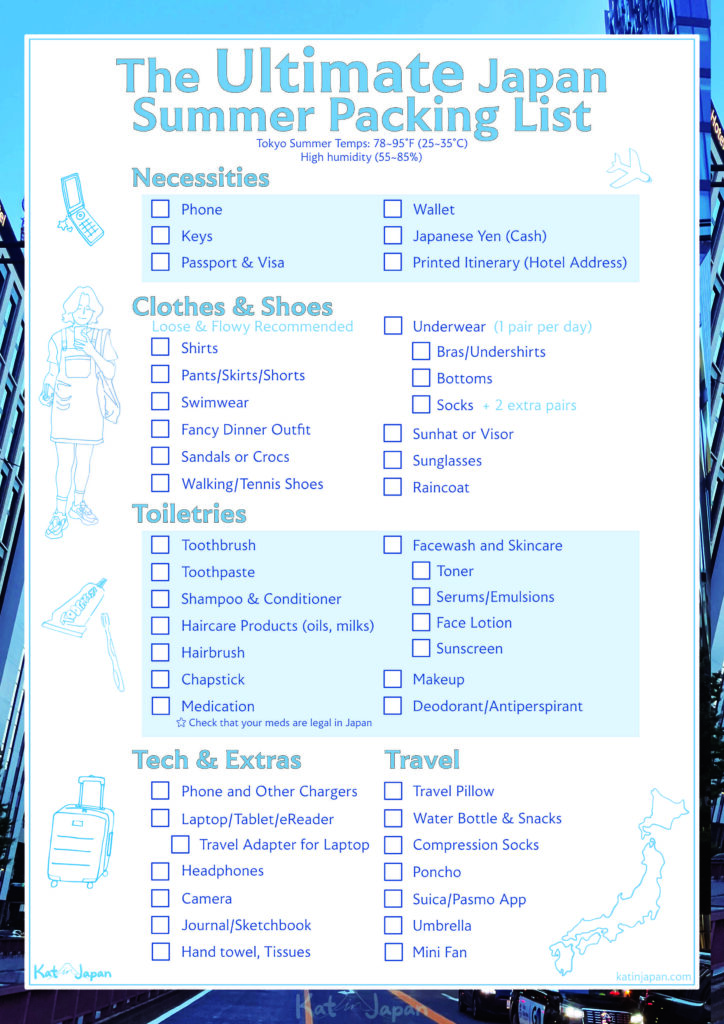
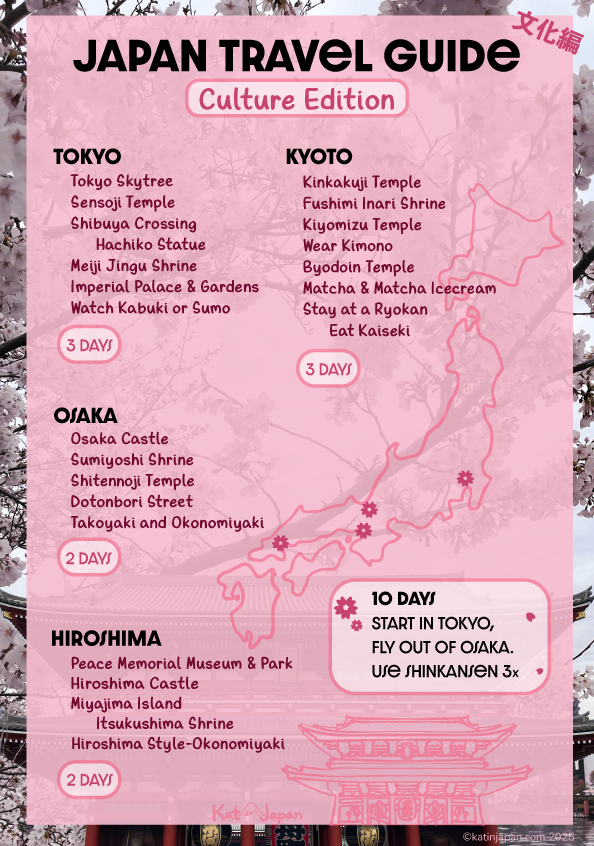
Get instant access to The Quintessential Packing List, The Ultimate Summer Packing List, and my Japan Travel Guide: Culture Edition Itinerary by signing up to the Kat in Japan Newsletter. Plus, get updated whenever I post a new blog!

Do Market, SEO, and Keyword Research
When I started my blog, I knew I wanted to write about living in Japan. I studied abroad in Japan during college, which filled me with experiences to share. So in a way, all my education had been leading me to create a blog. When we moved back to Japan, I knew I had to share my experiences with others.
In school, we learn how to write essays on a variety of topics, quickly and with understandable language. Those relatively short writing sprints, combined with how to create a works cited, properly format, and use correct grammar, are the perfect seed for blog content writing.
What school doesn’t teach you, unless you’re taking a marketing course, however, is how to write good copy and bring in an audience. That’s where marketing, SEO, and research come in.
Research
Look up the topic you’re trying to write about. What are the common keywords, and how can you distinguish your content from someone else’s?
Keywords that are heavily used will be harder to get views on. Topics that don’t yet have many articles or content will generally be easier to get clicks on.
Of course, you can still write topics that others have touched on, because your personal perspective is unique. However, finding new angles to an existing topic is key to success.
Try to center a few post ideas around these types of challenges:
- What do you wish you knew before X, Y, Z?
- What are the gaps you can fill within your niche?
Structure
Google likes lists and heading hierarchies. Make sure you’re using H1-H5 headings competently, and take an online SEO course to familiarize yourself with keyword search and other handy tips and tricks.
I took the HubSpot SEO course, and it went by quickly at 2x speed. It contained invaluable information on how to increase my visibility across search.
Analytics
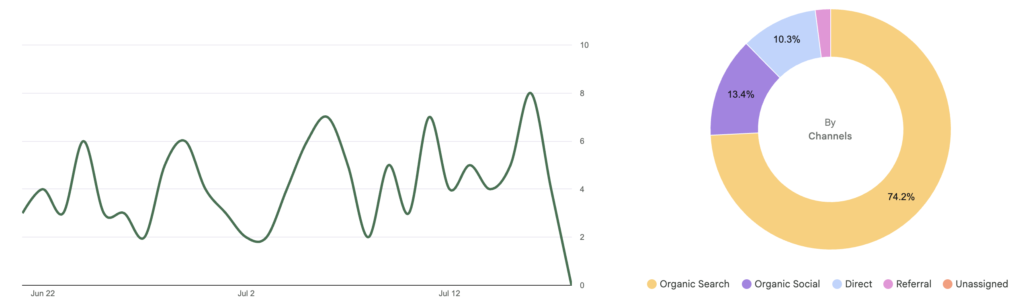
Once you’ve set up your website, connect to services like Google Analytics in the SiteKit plugin. That way, you can visually see how many people are visiting your website, how to improve your keywords, and more.
Marketing
If you thought blogging stopped at your own website, think again! To get people interested in your blog, you need to use social media effectively. Sure, people will organically find you via search. But by creating a social media strategy, you can increase your viewership dramatically.
Did you know that you can use websites and apps like Pinterest, Instagram, TikTok, and more to drive views to your website? By understanding the unique personalities of each site, you can make posts tailored to them and increase your readership.
When it comes to email newsletter marketing, this also means giving something to get something. To grow your audience, you have to provide value. This can be in the form of PDF guides, helpful worksheets, eBooks, and more.
Understand How AI Affects Search
In the age of AI, understanding how these “search” assistants find and parse data is important to getting your blog seen. I’m not a big fan of AI, all told, but it’s currently very popular.
So, if an AI search bot checks your blog, can it find its way around? Will it be able to provide that data to a searcher? These are questions to ask as you set up your blog.
Nowadays, if you want to start a blog, knowing how to get seen in the age of AI is unavoidable. HubSpot is now offering AEO courses to better understand search in the modern age.
Getting Adsense and Other Ad Integrations
When you start a blog, you have to consider its purpose. If the main goal of blogging for you is to get AdSense or other ad revenue, you have to tailor your content towards that specific goal. Pay attention to SEO and do research to find niches within your topic to fill. Let’s peel back the curtain a little bit.
For example, when I was struggling to find information on ETC Cards in Japan, I had to sift through Reddit threads, YouTube videos, the Nexco website, and other Japanese-language sites.
So when we finally got our ETC card through trial and error, I wanted to share my experience. So finding gaps in search where you could add some value is crucial to getting clicks.
Virality is also an important piece of this puzzle. If you publish a blog that generates interest and doesn’t have much competition, you can easily garner thousands of views.
My KFC Christmas in Japan blog is a huge driver of interest around the holidays because it’s interesting, unique to Japan, and has value: people can learn how to order the traditional KFC chicken bucket for their own celebrations.
So ask yourself, is this blog:
- Interesting
- Filling a niche
- Helpful
- Well-written
That last one is another crucial puzzle piece. If your writing is too complicated or too simplistic, people generally won’t like it. But having a unique voice is also part of branding.
Essentially, make sure you’re using understandable words, decent grammar, and strategies like lists and bullet points. Anything human-written is better than AI any day.
So, I hope that helped you understand how to start a blog with WordPress. If you have any questions, feel free to drop a comment below!
PS: I hope you’ll forgive the slight departure from Japan content with this one. Writing this blog has been one of my passion projects for the last few years, so I wanted to give back to the blogging community in a way. Back to the Japan content!